Author Manual
About Write With Me
Write With Me is a platform that wants to place your digital writing desk next to a community of writers and readers. If you are working on a piece here by yourself, jump into Forums to find someone to invite to your Post as a Companion. A Companion can be a Beta reader, a Proofreader, an Accountability Partner or play any non-author role that you need them to. Maybe you just want to show someone your project and yap about it with them, that's also companionship. Want to write a story collaboratively with a co-author? Write With Me has two systems for that. Invite another user you want to work with directly. Or publish the first few hundred words of your story and have others improvise the next bit to it, then select an author whose experience and writing style matches your expectations.
A Primer on Turns
At the core of Write With Me's system are Turns. A Turn is like a digital sheet of paper or segment that can accomodate up to 4400 words roughly. A complete piece of work (flash fiction, short story or novelette), called a Post, can be made up of as many Turns as you need. Each Turn is identified by a number (1, 2, 3, etc.). When you Publish a Post, its Turns are merged together in order of their number, to present to the reader a single block of literature. This is of course just done on the presentation layer, your turns always remain intact and separate in your Post's Dashboard page.
Solo
When you are writing a Post solo, Turns are just a way to break up your work into meaningful chunks. Perhaps they are scenes or small chapters, perhaps you write 1-2 Turns daily to meet personal writing goals.
Collaborative
... Turns are just a series of blank documents at first, just like the blank pages of a book that hasn't been written yet.
In a Collaborative Post, a Turn does not have a single author. You can Claim a Turn that is currently unclaimed and be able to edit it. When you are done, you can Unclaim it. Turns are just a series of blank documents at first, just like the blank pages of a book that hasn't been written yet. You can go in and start editing or filling up any Turn as long as your co-author isn't actively working on it as well.
The reason Turns don't have fixed authors is because it is usually not productive in a collaboration to try and formally attribute different sections of the work to different co-authors. The reason a Turn is simply not a collaborative document that both co-authors can edit in real-time is because we also want you to feel you are in a distraction-free personal writing space whilst you are typing and exercising your individual creativity. You will get a chance to add to or edit a Turn initially drafted by your co-author later once you agree on what to change. You have a chance to propose your ideas on it while it's being written using the Suggestions feature. And we understand that sometimes a real-time session really is needed to write a section together, we are hoping the Notes feature will cover that need for now. We could not perfect the design of Turns, but we have tried to balance both personal writing space and collective ownership in its underlying philosophy. Perhaps, with your feedback, there is still hope for us.
The flexibility of Turns allows you and your co-author to follow any methodology that suits the dynamic of your collective creativity:
Round-robin Turns with your co-author to just progress the story and have fun. You can brush it up later.
Write several consecutive Turns together if they are part of a story section you have taken responsibility for. Your co-author could be working on another section in the meantime.
Perhaps you are adept at using words without repeating yourself and your co-author is very good at coming up with relatable characters and believable plot points. Then your duo would be that of "The Wordsmith and the Plotsmith".
The question of the design of Turns sort of ties in with the greater question of collaboration itself. Ultimately, collaboration may not be for everyone. If you have a neat, detailed plot for a short story and are quite invested in your idea, that's awesome. But it might be best to write that by yourself. Bring in a Companion as a Beta reader to get an opinion on your work before you publish. But sometimes, it is possible to create something together that you would not have been able to create alone. And collaboration can genuinely be enjoyable. Each author can bring new developments to a prose that their co-author may not have considered. It's like not knowing exactly how your own story will spin out. However, co-authors will also benefit from discussing blueprints or outlines beforehand to ensure the finished work is coherent. In every case, communication, respect and responsibility are keys. Needless to say, you should work with someone whose writing style and taste aligns with yours to an extent, unless you are actually trying to pick up your co-author's style. Because Write With Me can be a great place for mentoring too. We are also thinking of a feature to change co-authors or to leave mid-project, it's still in the design phase. We would love to hear from you in the Forums how you want that feature to look like.
Solo Workflow
Start a Post by just pouring the opening few words of your fiction into a fresh Turn 1 sheet, found in your Home or Profile page. Make sure the solo box is checked. A collaborative Post cannot later be changed to solo.
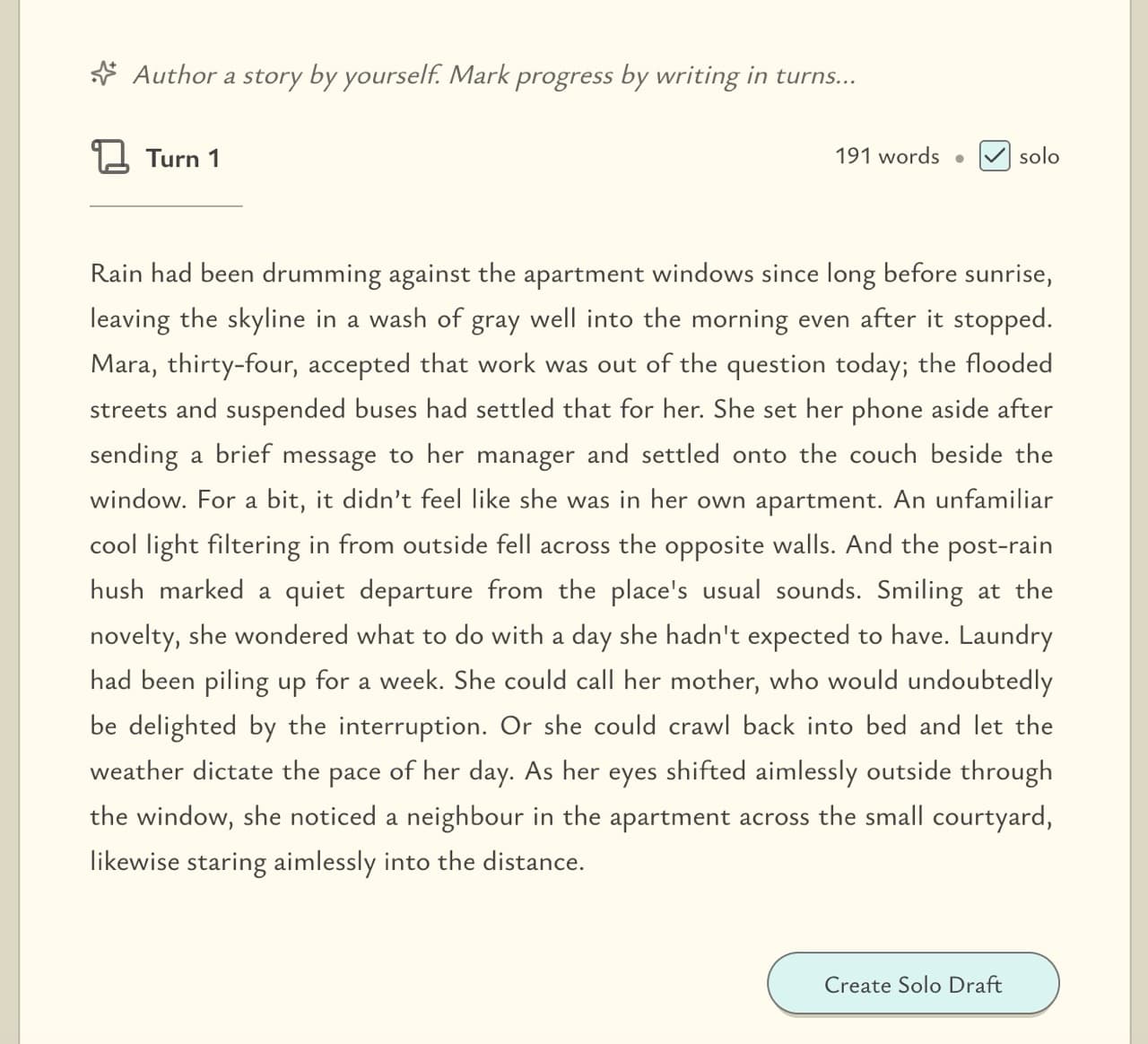
Tap Create Solo Draft to save the Post in AWAITING_PUBLICATION status and pick it up later from the Posts tab in your Profile page. Clicking on any unpublished Post from your Profile page will take you to its Dashboard page.
The Dashboard UI
This is your Post Dashboard where the writing actually happens.
The card in the middle has two parts. The top or head contains details such as title, status etc. and essential buttons like +New Turn, Publish etc. The rest of the card contains your Turns. Two arrow buttons enable you to navigate them and an input box to jump into any specific Turn.
The Turn that you are looking at will show who currently claims it (in solo that's always you) and its Suggestions button to the right. The button (Refresh) next to the word count is useful to fetch the latest Suggestions for this Turn without reloading the whole page.
On the left you have Notes and the Turns List. The three-dots menu button in the top-right corner of the middle card reveals a few important options like Companions and Tags.
The Status flow
A solo Post begins in AWAITING_PUBLICATION status during which it remains private to you and any Companions you give access to. When you publish, the Post moves to PUBLISHED status and becomes available for anyone to read under the Read tab in their Home feed. It also becomes shareable publicly on the internet. You can continue to edit your story even after publication.
Collaborative Workflow
Starting a Post
Start a Post by just pouring the opening few words of your fiction into a fresh Turn 1 sheet, found in your Home or Profile page. Make sure the solo box is unchecked. A solo post cannot later be changed to collaborative (for now, we are planning a feature to allow that in the future).
It's better to write a couple of hundred words or more for Turn 1 so that your prospective co-author can get an idea of the tone of your story and the style of your writing, to help them improvise more cohesively. The Turns shown here are kept small for demonstrative purposes.
If its not quite ready yet, tap Create Collaborative Draft to save the Post in DRAFTING status. Or if you are ready to find co-authors, tap Invite Authors right away to enter a few details. In the Invite step, choose whether to invite someone you want to work with directly or open up invitation for anyone willing to collaborate. You can reach the Dashboard of this Post later from the Posts tab in your Profile page.
The Dashboard UI (before a co-author has been found)
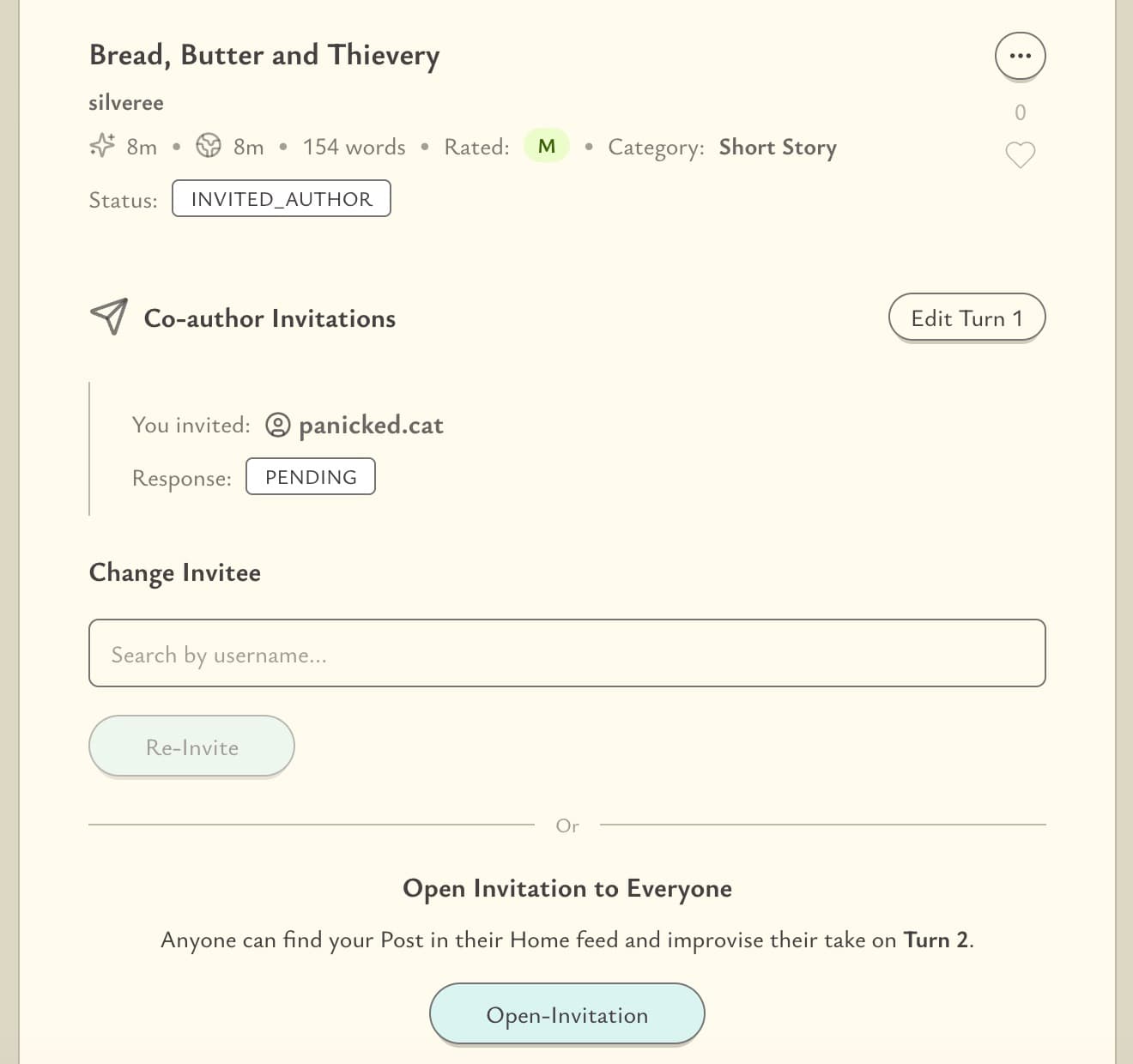
This is your Post Dashboard. In particular, this is the screen you would see if you had invited another user directly. Here, the post is in INVITED_AUTHOR status which is a private status, meaning it does not appear in any public feeds. You can edit your Turn 1 from here, but future Turns are locked until a co-author had been found.
Your Invitee will have received a personal notification and they will only gain access to your Dashboard if they accept your invitation, which will cause the Post to transition to COLLABORATING status. More on that later.
While in INVITED_AUTHOR status, you can still change Invitees. You can also open up invitations anytime, which would transition the Post irreversibly to INVITING_AUTHORS status. You can directly land on this status if you take the Open-Invitation path during post creation. When the Post is in INVITING_AUTHORS status, it is temporarily published to the feeds (under Collaborate tab in Home page) of other users, from where they can submit their individual improvisations of Turn 2 (known as Collab-Submissions) to your Post. A prospective co-author will be able to see and edit only their own submission. They do not have access to your Dashboard. Prospective co-authors access their pending submissions (to edit them) from their Profile page.
This is your Post Dashboard in INVITING_AUTHORS status. You can see the list of collab-submissions made by prospective co-authors. In order to proceed, you have to designate one of the submissions as the official Turn 2, and its author will be chosen as your co-author for this Post. This action cannot be undone. Choosing your co-author will transition the Post into COLLABORATING status, give your co-author full access to the Post Dashboard and unlock future Turns.
Collaborating
This is your Post Dashboard in COLLABORATING status.
The card in the middle has two parts. The top or head contains details such as title, status etc. and essential buttons like +New Turn, Publish etc. The rest of the card contains your Turns. Two arrow buttons enable you to navigate them and an input box to jump into any specific Turn.
The Turn that you are looking at will show who currently claims it and its Suggestions button to the right. The button (Refresh) next to the word count is useful to fetch the latest update and Suggestions for this Turn without reloading the whole page. The button (Refresh) next to "Total: N Turns" is useful to fetch newer Turns that your co-author may have created without reloading the whole page.
On the left you have Notes and the Turns List. The Turns List refreshes automatically every minute. Any new Turn created by your co-author will appear in this list within a minute and you can then refresh from the "Total: N Turns" section to access that new Turn. The three-dots menu button in the top-right corner of the middle card reveals a few important options like Companions, Tags and Grant co-author all Turn Claims.
In the COLLABORATING status, the Post becomes private again (removed from public feeds), its Dashboard accessible by only you, your co-author and any Companions that you have given access to. This status can last for as many Turns as the co-authors need to complete their work. Communicate with your co-author through Discussions and establish how you wish to share Turns and responsibilities. Read A Primer on Turns to understand the flexibility that Turns offer.
Publishing
Once they think its ready, both co-authors need to Publish in order for the Post to become publicly available again (under the Read tab in users' Home feeds). When one of the authors publishes, the Post moves to AWAITING_PUBLICATION status. There is in fact no functional difference between the COLLABORATING and the AWAITING_PUBLICATION statuses, except that the latter signals to the other author that the Post has been approved for publication by their co-author. Both co-authors can continue to add and edit Turns in this status. Once the remaining author also approves publication by tapping on their Publish button, the Post officially moves to the PUBLISHED status. Even after fully publishing the Post, both co-authors can continue to add and edit Turns.
Real-time Notes
Notes are useful for storing lore, character backstories, plot outlines. It can be a place for storing anything you think is useful for the story. Unlike Turns, Notes are a shared resource. Anyone with access to the Dashboard (co-authors and Companions) can edit Notes. Each Note can accomodate up to 6500 words roughly.
Since a Note is a real-time collaborative document, it can be used as a live brainstorming room with your co-author and Companions. You could edit a scene here together and later copy it out to a Turn. We admit this will take quite a tiresome bit of effort, [like you might have to talk inside italic parentheses like this] while doing the actual editing work outside them. We are trying to come up with better ways to communicate. We would love to hear from you in the Forums about the sort of communication tools you wish to see in Write With Me.
Suggestions
Suggestions is a versatile feature that can be used to:
propose edits and ideas for a Turn your co-author is working on.
leave your own thoughts or outlines for a Turn that you will come back to later.
perform your duties as a Proofreader or Critique Partner if you are a Companion on this Post.
The author who currently has the Turn's claim, can also Accept a Suggestion, which will cause that Turn's text to be replaced entirely with the Suggestion's text.
Tags
Tags can represent genres, sub-genres or story settings (locations, time periods) or tones. You can make up your own tag or pick from a list of pre-existing ones. Tags are vital for your co-authors and readers to find literature that fit their interests. This means when you specify a 'small-town-setting' tag, prospective co-authors who are interested in or good at writing 'small-town-setting' stories are more likely to find your Post and collaborate on it. Feel free to add multiple redundant tags to your Post, such as 'fantasy' and 'dark-fantasy' together or 'noir' and 'crime' together.
While tags are useful as story settings, it is however important to understand that making up tags to represent tropes or story archetypes such as 'rags-to-riches' may give the story away to a reader or discourage co-authors from writing freely.
Companions
Companions are users you can invite to your Post Dashboard to help you out in various non-author roles such as accountability/critique partners or beta/proof readers or any other custom roles you may require (e.g. Historical Accuracy Checker). Or maybe just invite someone to show them your project and talk about it. Visit their project as a Companion too. No matter the role, all Companions functionally have the same set of capabilities: they can leave Suggestions on Turns, edit Notes, participate in Discussions. These privileges allow them to carry out their responsibilities effectively.
Companions can only be invited directly, there is no open-invitation system for this. The Looking for People subject in Forums is the best place to post in when you need to find Companions.
When you are about to Publish a Post, you are given the choice to publicly acknowledge your current Companions. The Companions you mark as checked will be mentioned under Acknowledgments on the Post when readers find it in their feeds.
At present, Companions are only available for solo Posts and you can have a maximum of one Companion on a Post.
Forums
Forums are Write With Me's community space for official announcements and for users to connect with their fellow authors and readers.
Forums are sub-divided into several Subjects or topics dedicated to sharing advice on writing and collaboration, finding co-authors and companions, and discussing how you want to shape Write With Me as a platform.